How I work
I direct the vision. AI is my crew.
Think of how a film gets made. One director holds the vision, and a crew of specialists helps bring it to life. That's how I build learning experiences: I direct a crew of AI agents, and I'm also the designer, so I own the creative flow and give every piece its final human touch.
- Production
- Every project on this site
- Director & designer
- Tshwjxeeb Vaaj
- Crew
- Claude and a team of AI agents
- Final cut
- Mine, every time
Before the crew arrives
The design decisions come first.
Every project starts with the same instructional design work, and that part is mine: finding the real gap, deciding what people need to do, and planning how I'll know it worked. The AI crew joins once the plan is clear, to help me build it faster.
Find the real performance gap: a season I coached, a lesson I observed alongside a teacher, a regulation I read line by line.
Turn it into behaviors, measurable objectives and an assessment plan, using action mapping, ADDIE and UDL.
Storyboard and prototype in Figma, Rise 360 or HTML, then walk the flow the way a learner would.
Direct the AI crew to speed up the build, then review every take and revise from feedback.
Scene 1 · The crew
Everyone on set has one clear job.
When every role is clear, the work moves fast and nothing slips through. Here's who does what, listed the way the credits would roll.
- Director & designer Tshwjxeeb VaajHolds the vision and owns the creative flow. I make the design calls, review every take, and add the human touch that makes it feel right for a real learner.
- Production lead ClaudeTakes each task from me, runs the right playbook, and drafts, builds and checks, so I can stay focused on the decisions.
- Script supervisor The Quality CheckWatches every take for mistakes. Each draft passes the same checklist: my real facts, no invented numbers, my voice and my style guide.
- Researcher GeminiDigs into the research before I commit to a direction, bringing facts and a different point of view so my choices are grounded, not guesses.
- Second unit The Morning CrewScheduled runs that go out before I wake up, like my weekday roundup of new instructional design roles, and report back.
- Art department Midjourney, Flora AI & Nano BananaSets the look and generates the scenes, keeping the same people, places and style consistent from screen to screen.
- Continuity The PlaybookOne place for my background, decisions, style guides and project details, so nothing gets decided twice.
- Calling cut The Stop SwitchOne command pauses every scheduled run at once. When a take isn't right, I call cut.
The kitFigma (prototyping, variables, Smart Animate) · Articulate 360 and Storyline 360 (prototyping, interactive modules) · Claude (drafting, skills, scheduled tasks, vibe coding) · Midjourney · Flora AI (Nano Banana) · Gemini · HTML/CSS/JavaScript · GitHub Pages
Scene 2 · Why a director
Directing a crew is designing for learning.
A good director doesn't do every job. They make the vision clear, give each person a role they can own, cue them at the right moment, and check the take before moving on. That's the same work as designing training that moves a whole team toward one outcome. To direct the crew, I have to understand each job well enough to teach it, and that's exactly what instructional design asks of me.
Scene 3 · The problem
The idea isn't the bottleneck. Everything around it is.
Good scenario design is slow, and the idea is rarely the hard part. The time goes to everything around it: turning lived experience into clear behaviors, drafting branches, making dozens of consistent images, catching mismatches across screens, and keeping the case study up to date. Done by hand, that work crowds out the judgment calls that decide whether a scenario actually lands for a learner.
Scene 4 · From script to screen
Every project goes through the same production.
Instead of asking AI one question at a time, every project moves through the same three phases. Each step hands off to the next, and I review the take before it moves on.
“The crew does the legwork. I call every cut.”
Pre-production
- 01Real story
- 02Action map
- 03Storyboard
Production
- 04Visuals
- 05Prototype
Post-production
- 06Check
- 07Case study
Scene 5 · On set
Where the crew shows up in real work.
AI image pipeline
I set the look in Midjourney, then generate scenes in Flora AI with Nano Banana, keeping the same players, uniforms and gym consistent across all three sets of Coaching Through Conflict.
Action maps & storyboards
Claude helps me draft action maps and storyboard tables from my own experience. I decide which behaviors matter and what every screen says.
One design, any platform
The same script and images move from a Figma prototype to a web build to Storyline 360 in Articulate 360, so the module can run wherever learners are.
Branching prototypes in Figma
68 connected screens with prototype links, variables that remember a learner's guess, overlays and Smart Animate.
Vibe-coded builds
Pip's Number Garden, the TV Sales Enablement Simulator and this website were built by describing what I wanted and refining the code with AI.
Morning roundup
A scheduled task searches new instructional design roles every weekday morning and sends me the best matches before I start my day.
Scene 6 · Rules on set
Six rules every production follows.
No invented numbers
Every claim is checked against my real facts. If I haven't measured it, it doesn't go on the page.
Nothing ships without a playthrough
I walk every branch as a learner would before calling a module done, and fix what feels off.
Real people stay protected
Jersey numbers stand in for student-athletes, AI scenes use no real faces from my teams, and images carry no brand logos.
Every module gets an evaluation plan
Each project names what success looks like at all four Kirkpatrick levels before I call it done.
The style guide is the standard
Colors, type, buttons and spacing come from one style guide, so every screen matches without guesswork.
Accessibility is part of done
Readable sizes, alt text and a reduced-motion setting are built in from the start, not added at the end.
Final cut
The final cut is always mine.
AI doesn't decide what's true, what's fair to a learner, or how a moment should feel. My crew speeds up the busywork so I can spend my time on the parts only a designer should own. I'm open about where AI helps, because being clear about that line is part of designing responsibly.
Hiring teams keep asking how people actually use AI in instructional design, beyond a chatbot. This is my answer in practice: every project and visual on this site came out of this production.
Behind the scenes
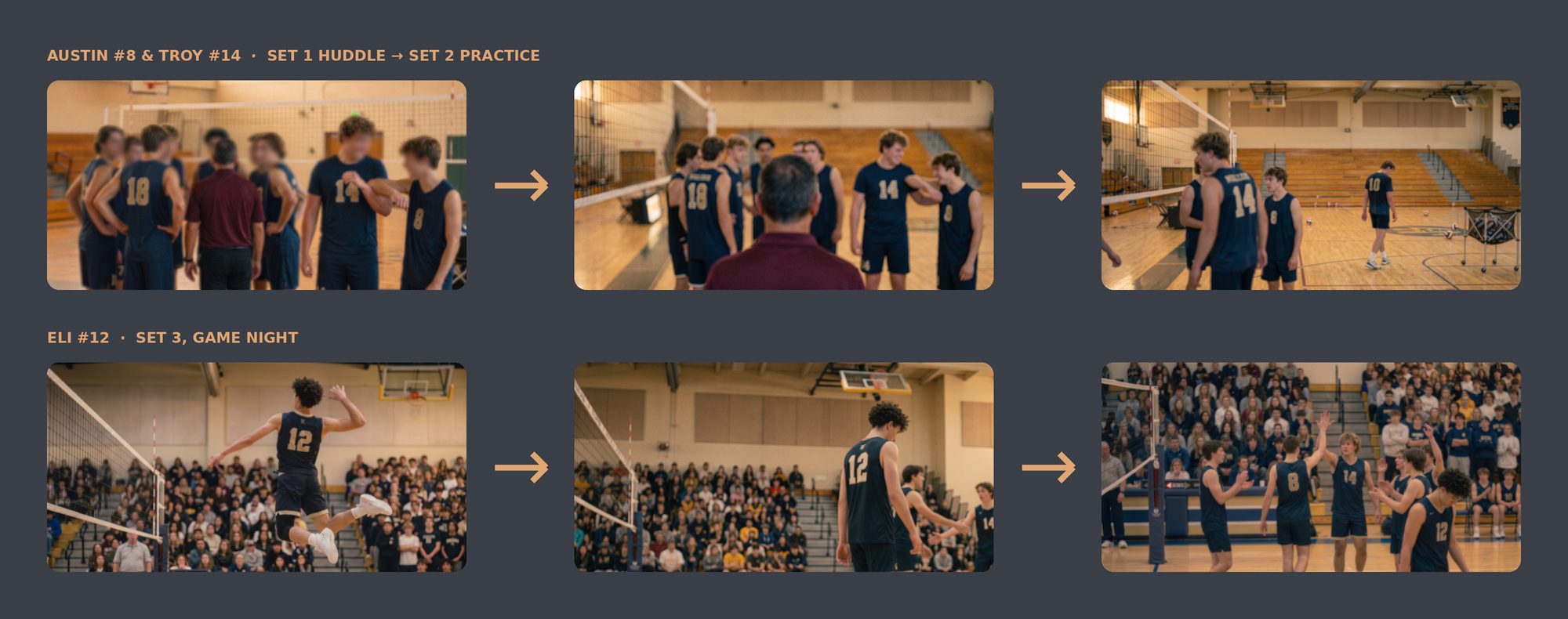
Same players, every scene
Austin, Troy and Eli stay recognizable from a practice huddle to a packed match night.
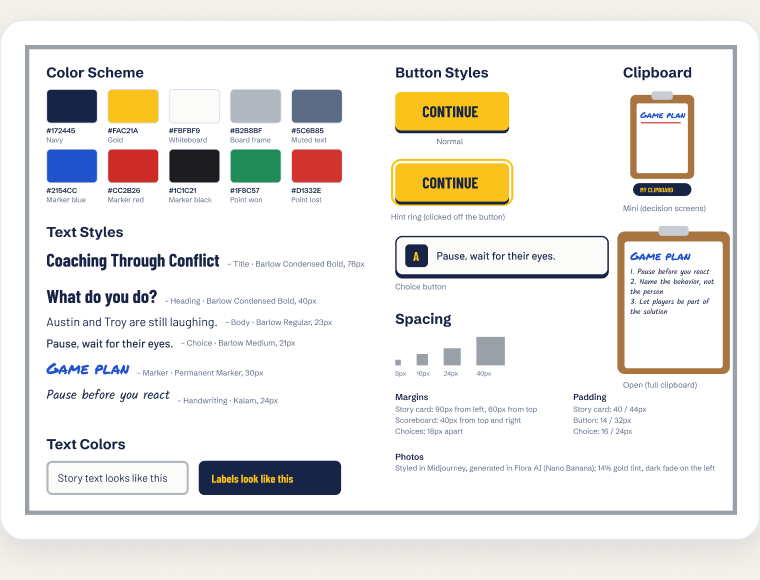
One style guide for every screen
Colors, type, buttons, spacing and the clipboard, defined once and used across all 68 screens.
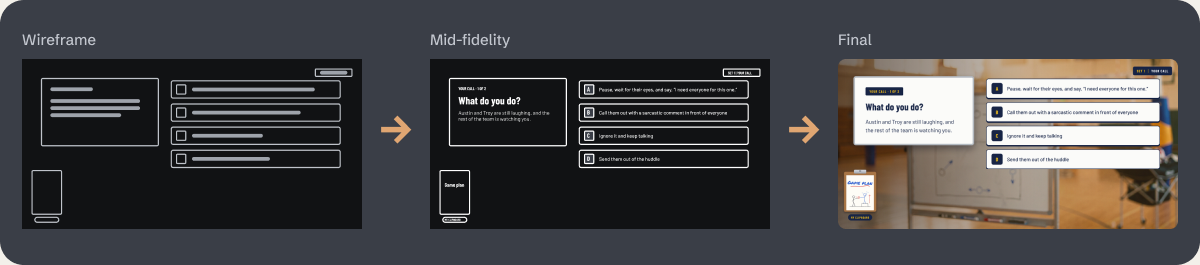
From wireframe to final
Grey boxes first, then the real script, then the finished scene, so layout decisions happen before visuals.
Now showing
The flagship this crew produced: Coaching Through Conflict.
A scenario-based simulation for new head coaches, built with this production process from my own season as a head coach.
Let's talk.
Hiring for an instructional design role, or curious how something on this site was built? I'd love to hear from you.