“In good teams, coaches hold players accountable. In great teams, players hold players accountable.”— Roy Keane
Portfolio concept · Figma prototype and HTML build, Storyline 360 in progress
- Audience
- New varsity volleyball head coaches, assistants stepping up, and the program directors who train them.
- Problem
- New coaches meet player conflict with control and pressure, which drains both the player and the team. I did it myself during a 0–10 season.
- My role
- Sole designer and subject matter expert: needs analysis, action map, storyboard, style guide, prototype and build.
- Constraint
- No real student-athletes on screen and no pilot group yet, so the scenes use AI-generated players with consistent jersey numbers.
- Outcome
- A 68-screen branching scenario that plays in any browser, built on the method that took my team from 0–10 to 6–4 and a first-ever top four regional performance.
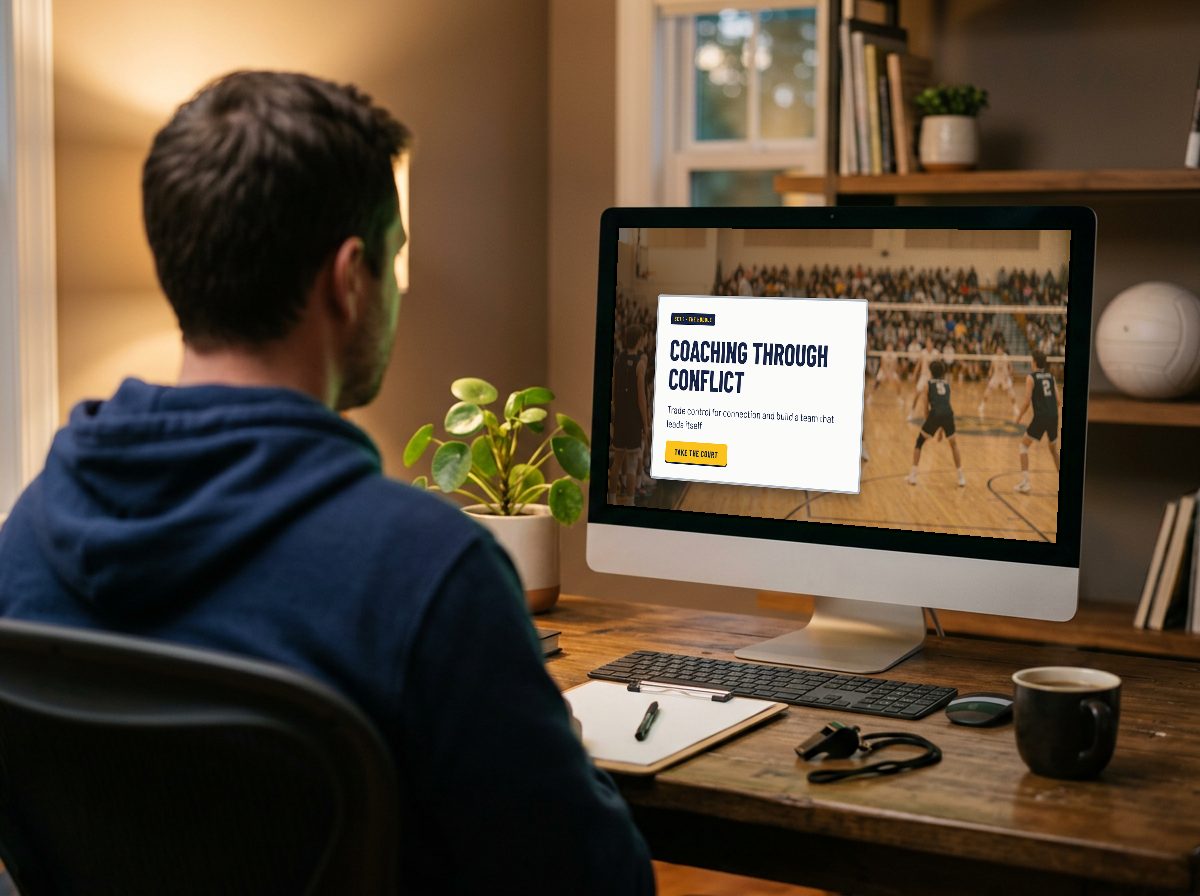
Coaching Through Conflict
A scenario-based simulation for new head coaches
Coaching Through Conflict is a scenario-based training module that teaches new varsity volleyball head coaches to handle the moments that test every coach: a distracted huddle, a disengaged star, a match on the line. Learners choose how to respond and see how each choice affects the team, without real players paying the price.
How this was designed
Designed backward, in three steps.
Stage 1 · The goal
Start with what they must do
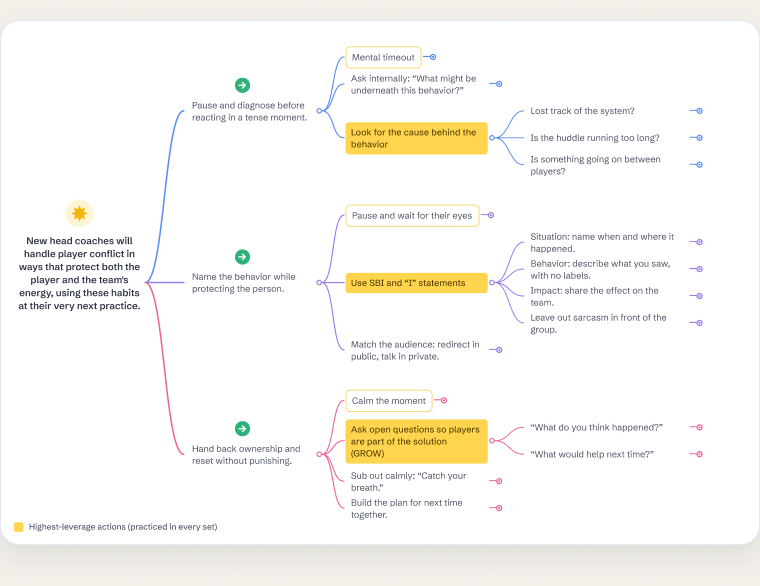
New head coaches handle player conflict in ways that protect the player and the team's energy. I mapped that goal down to three on-court habits.
See the learning objectivesStage 2 · The proof
Decide the proof
Each habit has a check built in: the coach's mental-timeout guess shown beside the real cause, and their first-try choice at every decision.
See the evaluation planStage 3 · The practice
Build the practice
Only then did I build the scenes: 68 screens of branching practice, focused on the three highest-leverage habits from the action map.
See how I built itBuilt for transfer
The same three habits, three different moments.
A distracted huddle, a disengaged star and a match on the line. Coaches apply the habits to a new situation each set instead of repeating one memorized answer.
UDL built in
More than one way in.
Ideas are taught on a whiteboard, written on the clipboard, then practiced in scenes. Replay the point lets coaches retry any decision without restarting.
Honest note: the module is still a concept. The Stage 2 checks are built into the prototype or planned for a future group of high school volleyball coaches.
My process
From problem to prototype
 Analyze
Used my own 0–10 season as the needs analysis, then action-mapped the goal down to on-court behaviors.
See it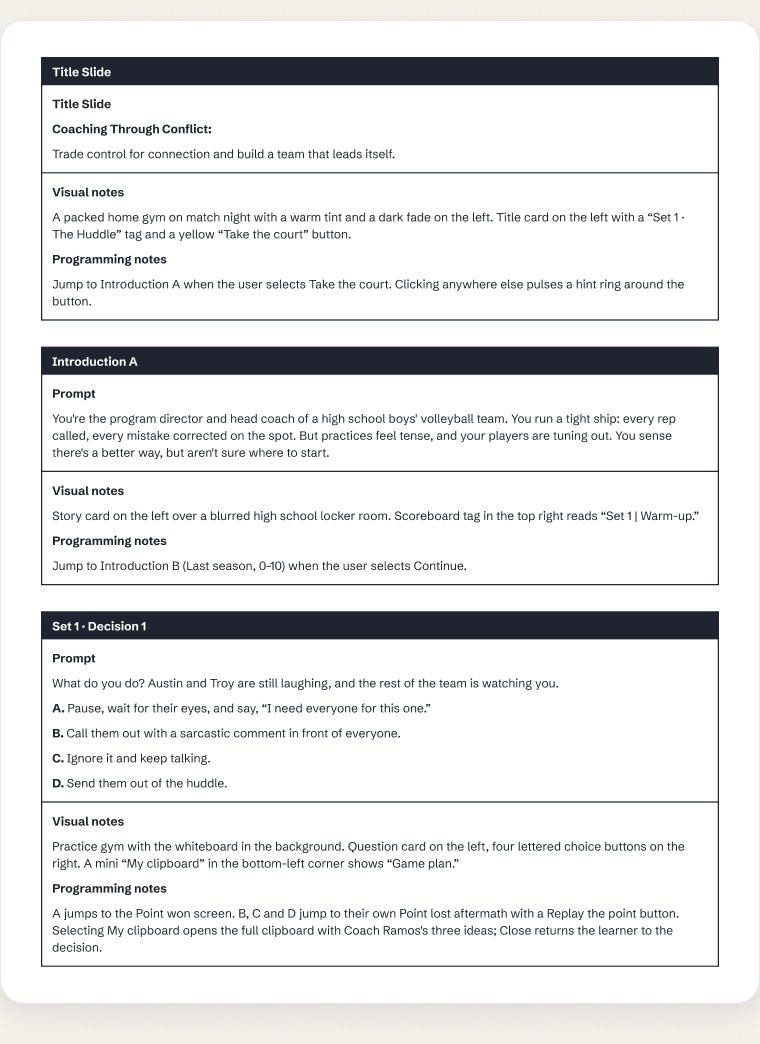 Design
Wrote a text-based storyboard for every screen and built a style guide so all 68 screens stay consistent.
See it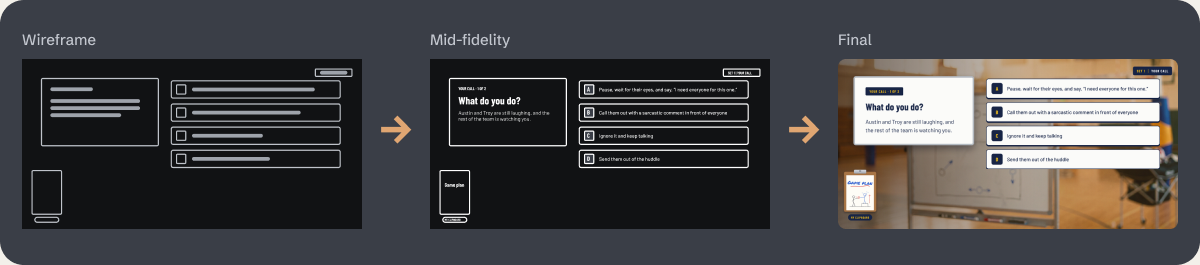 Develop
Went from grey-box wireframes to a 68-screen branching prototype in Figma, then started the build in Articulate Storyline 360.
See it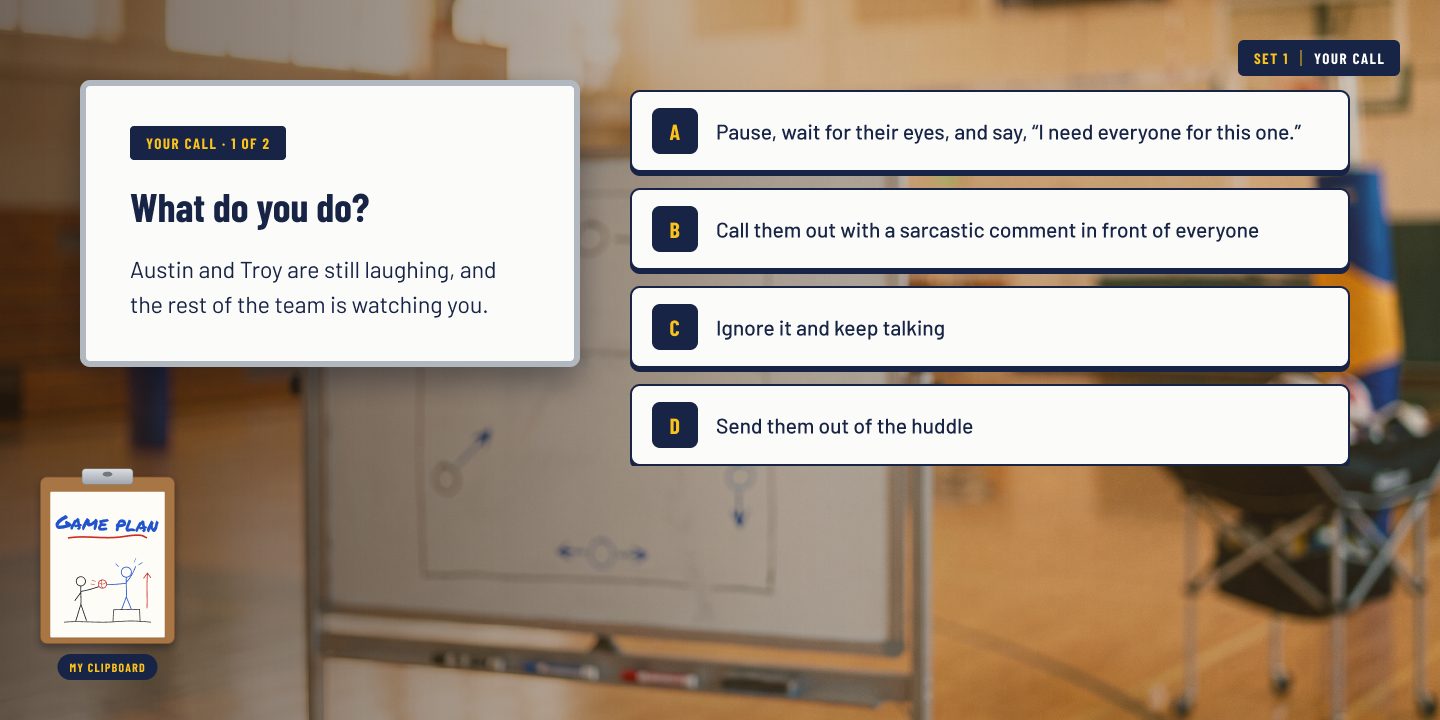 Evaluate
Wrote an evaluation plan at all four Kirkpatrick levels for a future group of high school volleyball coaches.
See itThe Problem
This isn't a hypothetical. I'm the program director and head coach it's based on. In my fourth season, our high school boys' program finished last in our league at 0–10. In my fifth season, we placed third at 6–4, qualified for the regional tournament, and reached the program's first-ever top four regional performance.
What I discovered is that a coach has to protect two things at once: the player and the team's energy. In that fourth season, I failed to do both. I got angry, micromanaged every rep and piled pressure on my players, and the team's energy drained away.
Read moreWhy the player and the team's energy rise and fall together
Then I realized the two work hand in hand. You can't have one without the other, because each feeds directly off the other: a player who feels protected gives energy back to the team, and a team with good energy lifts every player in it.
We're in a new time of coaching, one that's moving away from yelling and reprimands and toward empowerment, giving athletes an identity they can carry off of the court. We define who they are as people; they define who they are as a team. But we can only push them so far. In an environment that demands results, pushing is all we know how to do, and we push our athletes until they break. It's here, in this moment, that we need to know how to lift our athletes. As coaches, we can't pull our athletes to where we want them; we can't force them to be great. But we can empower them to achieve great things on their own.
Learning objective: By the end of this module, coaches will be able to handle player conflict in ways that protect the player and the team's energy.
Learning objectives
What learners will be able to do
Given a player-conflict moment in practice or a match (a distracted huddle, a disengaged star, a teammate's frustration boiling over), a new head coach will be able to protect the player and the team's energy by:
- 01
Pausing and naming a likely cause behind the behavior before reacting.
Measured by: the learner's mental-timeout guess, shown beside the real cause on the next screen.
- 02
Addressing the player with an SBI (Situation–Behavior–Impact) and “I” statement instead of a public correction.
Measured by: choosing the SBI-based response at each decision point.
- 03
Asking an open question that makes the player part of the solution.
Mastery: reaching the success screen in all three sets.
Each objective comes straight from a highlighted sub-action on the action map.
Action Map
I served as my own subject matter expert, drawing on five years as a head coach and program director and on what I saw sitting in on a friend's college men's volleyball practices. Using Cathy Moore's Action Mapping model, I started with the goal instead of the content: new head coaches handling player conflict in ways that protect both the player and the team's energy. From there, I mapped the on-court behaviors coaches need to do to reach that goal, rather than what they need to know about conflict theory.
Read moreWhy I built the scenarios around three high-leverage sub-actions
Each behavior then broke down into smaller sub-actions. To keep the training focused, I built the scenarios only around the highest-leverage sub-actions, shown in yellow: looking for the cause behind the behavior, using SBI and “I” statements, and asking open questions so players become part of the solution. Learners practice these in every set because they address the root causes behind most player conflict: unclear expectations, misread effort, and frustration with nowhere to go. If new coaches master these, the larger goal is far more likely to follow.
Design artifacts
How I built it
Open any step to see the artifact and the decisions behind it.
The ProcessADDIE, with my own 0–10 season as the needs analysis
I followed the ADDIE model (Analyze, Design, Develop, Implement, and Evaluate). My analysis wasn't a survey; it was my own season. In my fourth season, I had a talented group, many of them just up from JV, but the way I coached held them back: I micromanaged every rep, got angry, and my assistants and I piled pressure on kids who mostly lacked varsity experience. We went 0–10. Then I sat in on a friend's college practice and watched him give his athletes real autonomy, and I rebuilt how I coached around that. The next season we went 6–4 and reached the program's first-ever top four regional performance. I distilled what changed into three principles (backed by the SBI and GROW frameworks), then designed a storyboard, built a clickable prototype, and refined it.
Each phase stayed anchored to one question: what does a coach need to do in the moment, not just know? I learned the answer the hard way, and the module exists so other coaches don't have to.
Text-Based StoryboardEvery screen planned, from the visuals to the exact words
Once the action map was set, I wrote a text-based storyboard to plan the whole module, from the visuals and interactions to the exact text on every screen. Every piece was designed to put the learner on the court as the coach, showing consequences through the natural story of a season rather than right-or-wrong pop-ups. Each scenario was built around the core habits from the action map, and the scenarios themselves came from real moments in my own seasons as a head coach: two players laughing in the back of a huddle, a star player whose energy was fading, and a teammate's anger boiling over during a match.
Following Mayer's personalization principle of multimedia learning, the module speaks directly to the learner as “you,” and the storyboard plans every line of the mentor, Coach Ramos, along with each decision and its consequence.
Style GuideOne Figma system for all 68 screens
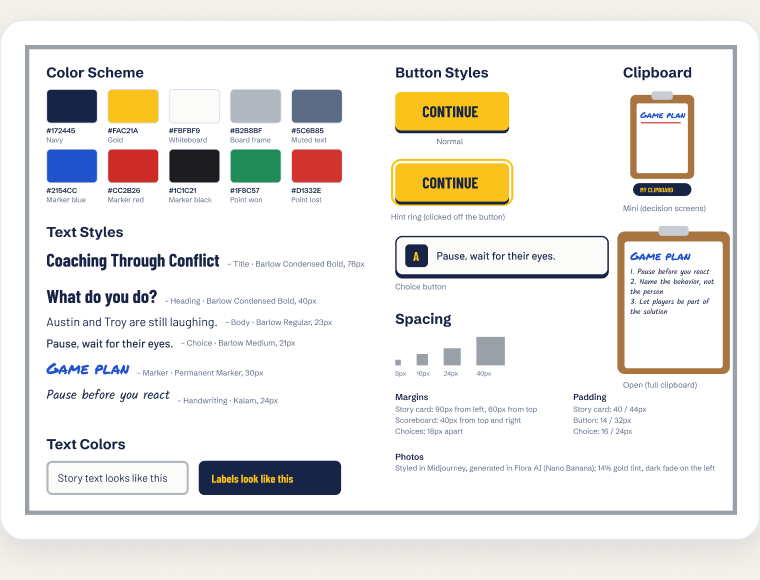
Before building the full module, I created an eLearning style guide in Figma so every color, font, button and spacing choice stayed consistent across all 68 screens. The palette pulls navy and gold from the team's jerseys and pads, adds marker colors for Coach Ramos's whiteboard chalk talks, and saves green and red for points won and lost. Every element became a reusable style or component, so one change updates every screen.
Wireframe ProgressionFrom grey boxes to the final screens
Next, I built wireframes and mockups to dial in the layout before adding any visuals. I started with grey boxes to place the story card, the four choices, the scoreboard and the clipboard, then moved to a mid-fidelity version with the real script to check reading length and flow. The final screens add the gym scenes with a warm gold tint and a soft dark fade, so the cards stay easy to read.
AI Image Generation & Character ConsistencyKeeping the same players across three sets
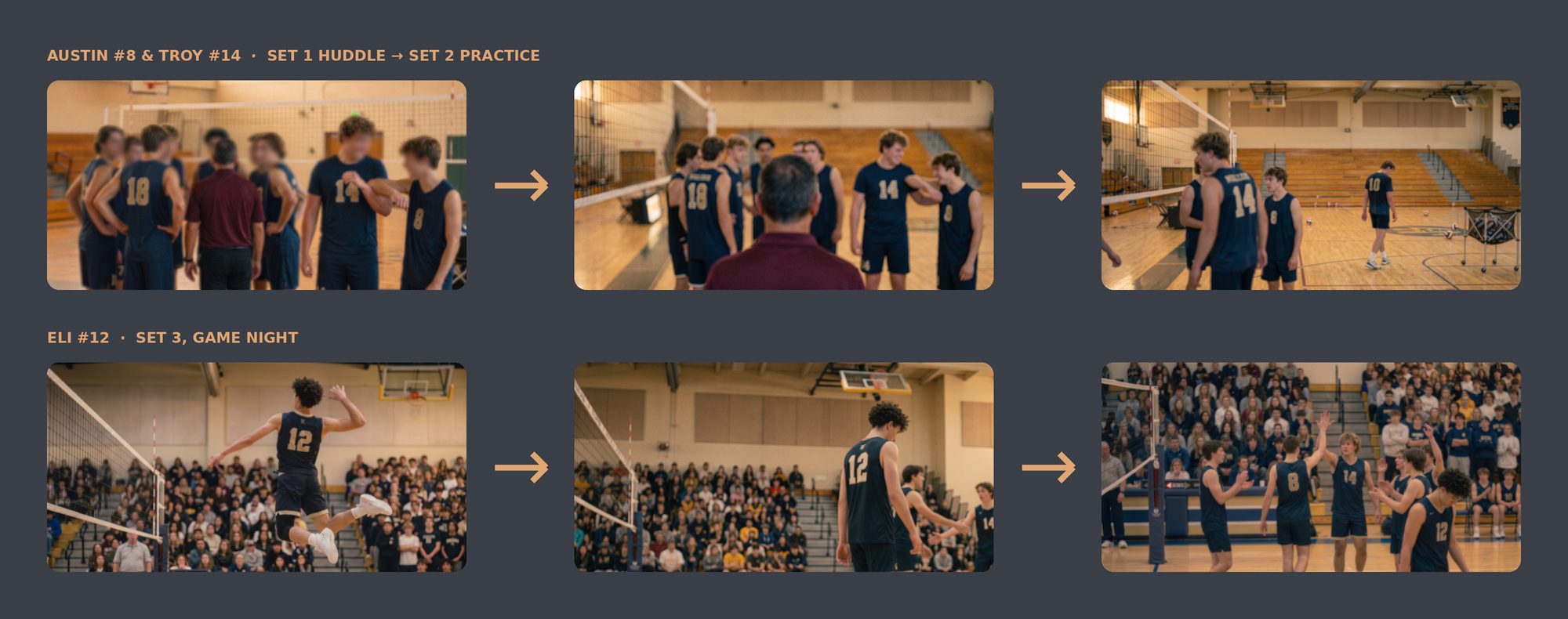
From the start, I wanted the module to feel like you were standing in the gym with your own team, so I used AI to build the scenes: Midjourney to explore the style and mood, then Flora AI with Nano Banana, plus Gemini, to generate the images themselves. AI imagery brings its own creative and iterative challenges, so my wireframes worked as loose guides that I adjusted or threw out as the scenes came together. The biggest challenge was consistency: the same players had to appear across three sets, from a practice huddle to a packed match night. I kept the navy-and-gold uniforms, jersey numbers and gym details steady from scene to scene, so learners can follow Austin (#8), Troy (#14) and Eli (#12) from one moment to the next.
Visual MockupsA visual identity rooted in the sport
I studied how story-driven scenario modules pace their openings, and used what I learned to build a visual identity rooted in the sport itself.
The final style pairs photorealistic gym scenes with story cards designed as coach's whiteboards, in navy and gold drawn from the team's pads and jerseys. Headings use a condensed athletic typeface, while the chalk-talk screens use marker fonts and hand-drawn doodles. A scoreboard chip tracks progress, and jersey numbers stand in for player portraits, so the module never needs photos of real student-athletes.
Interactive PrototypeTesting the flow early, plus the mentor and the clipboard
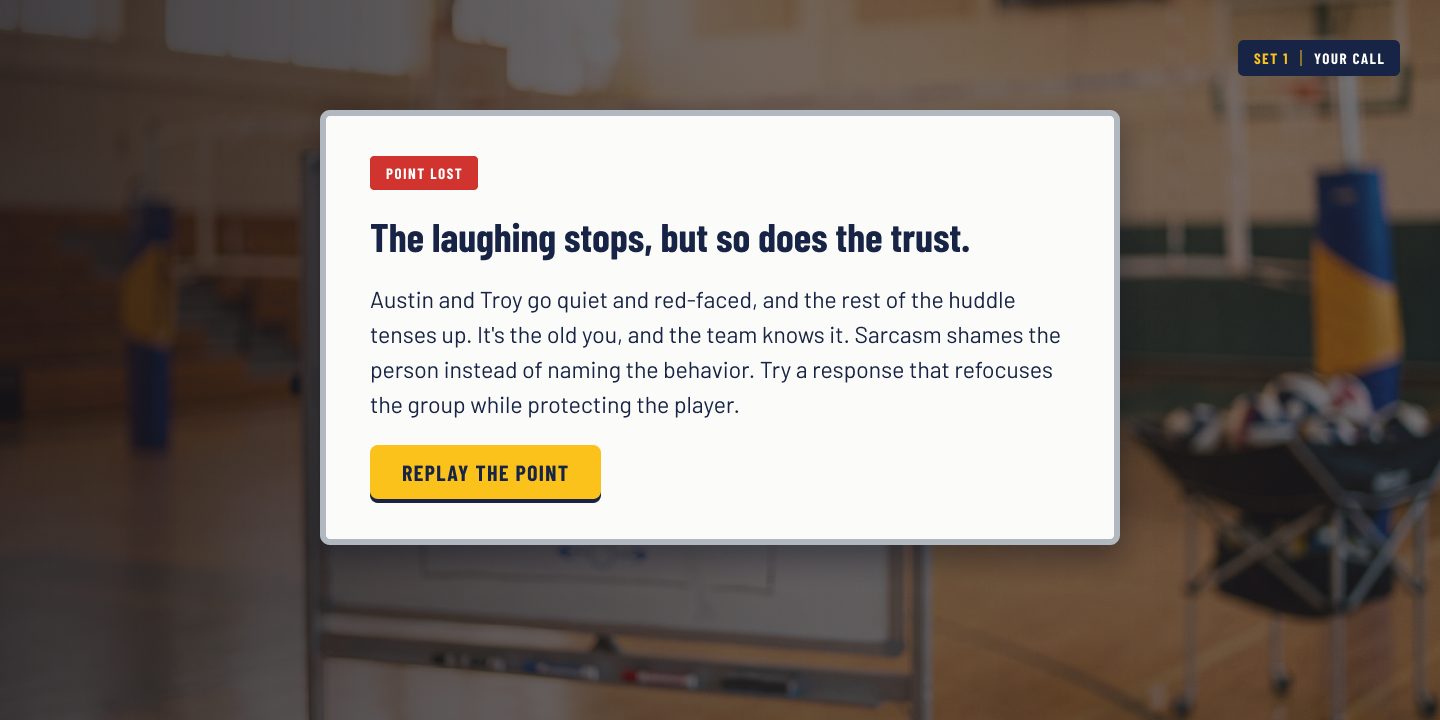
I built an interactive prototype in Figma to test the flow and functionality of the module before building out every scenario. The first version included the opening story, Coach Ramos's chalk talk and the first huddle decision, so I could gather feedback and refine the design early.
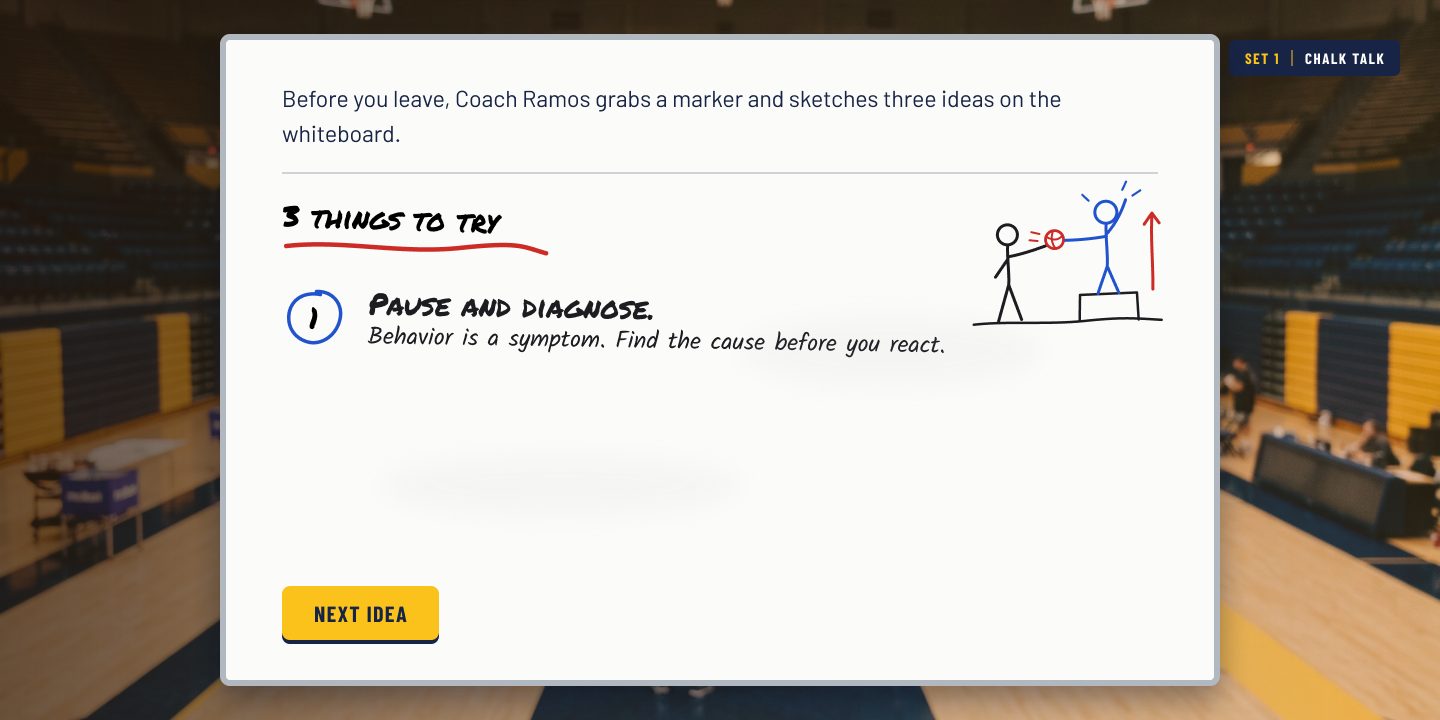
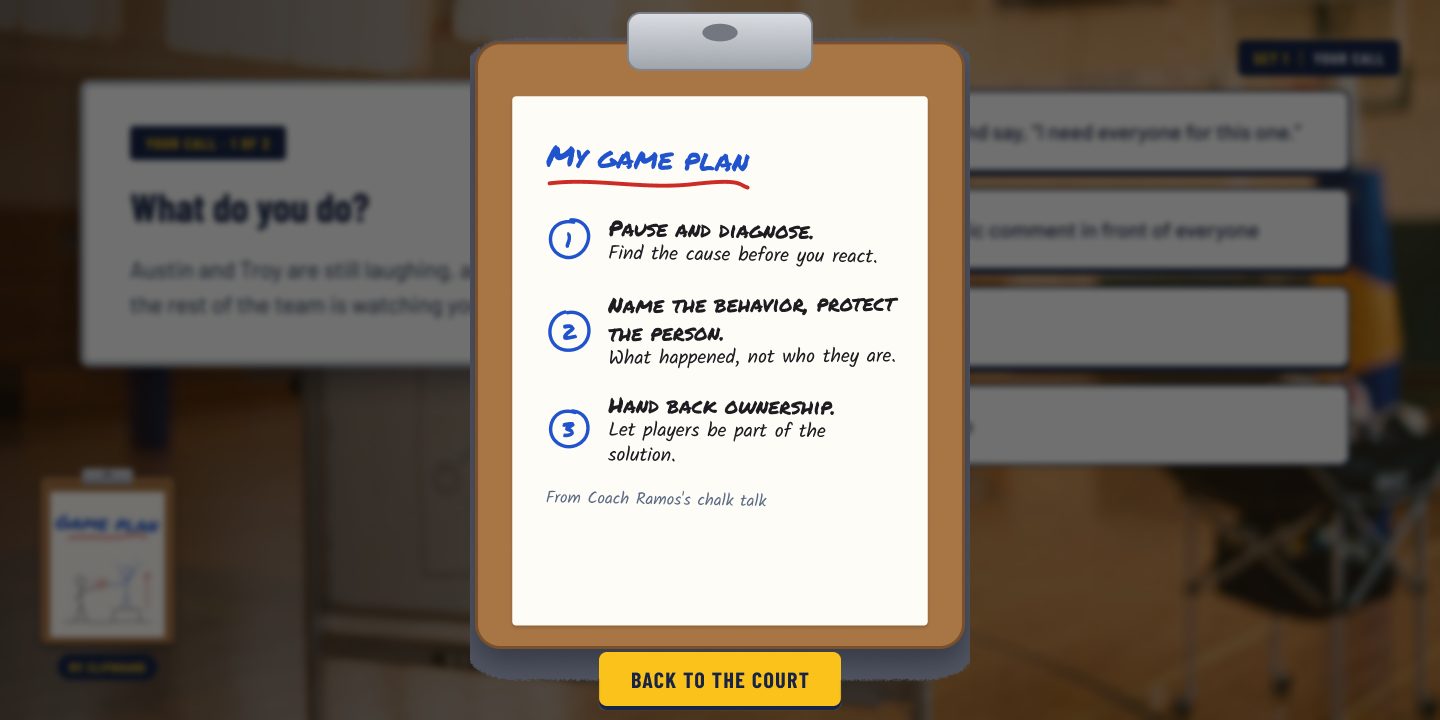
To support learners the whole way through, I added a mentor and a memory aid. Coach Ramos, a college coach whose players run their own practices, teaches the three core ideas on a whiteboard before the first scenario. Learners then copy those ideas onto their own clipboard. On every decision screen, a small “My clipboard” sits in the corner; selecting it opens the full game plan as an overlay, and “Back to the court” returns the learner to the same moment. Learners can check their notes whenever a choice gets hard without losing their place, the same way a real coach glances at a clipboard on the sideline.
Full Development
After several rounds of iteration, I developed the full module as a clickable prototype: 68 screens that move from a story-driven opening through three sets of decisions and a closing season wrap-up with Coach Ramos, each wrong choice with its own aftermath, and a success screen for each set. Each round of changes came from walking through the flow as a learner would. For example, I replaced a text-message exchange with a whiteboard chalk talk, so the mentor teaches the principles directly instead of just encouraging the learner.
Once the Figma prototype was final, I rebuilt the module as a web page in HTML, CSS and JavaScript, using the same script, images and branching, so anyone can play it in a browser on a computer or a phone.
I've also started rebuilding the module in Articulate Storyline 360, the authoring tool many L&D teams use. So far I've built the opening story and Coach Ramos's chalk talk in Storyline, using the same script, scene images and style guide. Next, I'll build the three sets of decisions with their aftermaths and Replay the point branching, so the finished module can be published for an LMS.
Read moreHow the branching, Smart Animate and the mental-timeout variable work
I also used Figma's prototyping features to make the experience feel responsive. Prototype links handle the branching, so each choice leads to its own consequence and every “Replay the point” button returns learners to the decision. Smart Animate reveals the whiteboard ideas one at a time, a “mental timeout” screen lets learners tap their best guess about what is behind the behavior, and dissolve transitions carry the story from scene to scene. A prototype variable also remembers the learner's mental-timeout guess, so the follow-up screen shows that guess beside the real cause.
Accessibility & UDL
Designed so more learners can get in
Built in
- Feedback never relies on color alone: every outcome carries a written label like “Point lost” and a plain explanation of why.
- Story text sits on solid, light cards over the photos, so it stays readable against busy gym scenes.
- The “My clipboard” memory aid keeps the three core ideas one click away on every decision, which lowers the load on working memory.
- Multiple means of representation (UDL): the ideas are taught on a whiteboard, written onto the clipboard, then practiced in scenes.
- “Replay the point” lets learners retry any decision without restarting, so mistakes become practice.
Next accessibility pass
- Check every card and button against WCAG 2.2 AA contrast (4.5:1 for body text).
- Add alt text and screen-reader descriptions for each scene in the final build.
- Finish the Storyline 360 build with full keyboard navigation and a logical focus order (Figma prototypes are mouse-first).
- Offer narrated chalk talks with captions as an option.
Results
The method is already proven: holding this standard for myself and my assistants is what took my own program from 0–10 to a 6–4 season and the program's first-ever top four regional performance. The module that teaches it is still a concept, so the next steps are to finish the Storyline 360 build and test the full module with other high school volleyball coaches.
Read moreMy biggest takeaway from the season and the build
My biggest takeaway is that the shift had to start with me before it could reach the players: trading control for ownership changed the team only once I changed how I coached. The module is built to pass that lesson on, in the learner's own world of the gym, the whiteboard, and the huddle. These insights will shape how I design future scenario-based training for coaches, teachers, and teams.
Evaluation plan
The module is the next test, so I've planned how I'd measure it with a group of high school volleyball coaches, using Kirkpatrick's four levels.
Coaches find the scenarios realistic and useful.
Short survey after the module: realism, relevance and confidence (1–5).
PlannedCoaches spot the cause and pick the SBI and open-question responses.
First-try choices at each decision; mental-timeout guess vs. the real cause.
Built into the prototypeCoaches use the habits at real practices.
Two-week self-check against the clipboard habits, plus an assistant coach's observation.
PlannedCalmer huddles and players who own the fix.
Program director check-in at season's end, compared with my own 0–10 → 6–4 baseline.
Observed on my teamLessons Learned
This was my first training module, built alongside AI with no formal instructional design training.
Read moreWhat building with AI taught me about instructional design
This was my first training module, and I built it with no formal instructional design training. What made it possible was learning to build alongside AI. Through vibe coding and AI tools, I turned the ideas in my head into working drafts quickly, then spent my own time on the decisions: what each coach should do, and how each consequence should feel.
The biggest lesson was that I didn't need to know everything before I started. I needed a clear goal, a real story, and a willingness to learn the tools as I built. Each round of feedback from the AI taught me something new about instructional design, and I could test those ideas right away. I'm excited to keep growing this skill set as AI keeps expanding what's possible in scenario-based learning.