Schedule a Patient Follow-Up
A software-training module for new front-desk staff
Portfolio concept · Figma prototype and HTML build, with a fictional clinic and app
- Audience
- New front-desk and scheduling staff at an outpatient clinic, and the supervisors who onboard them.
- Problem
- Software demos stop at “click here,” so new staff miss the detail that matters: the right patient and the right provider.
- My role
- Sole designer: objectives, Show me / Try me / Test me flow, feedback, Figma component library, prototype and HTML build.
- Constraint
- The practice had to recreate a real scheduler's traps, like look-alike patients and a pre-filled wrong provider.
- Outcome
- 29 screens, 14 feedback pop-ups and 350+ interactions, ending with a five-step job aid for the desk.
A short, practice-first module that teaches new front-desk staff to book a follow-up visit in a clinic scheduling system. Learners watch the task once with callouts, then do it themselves from a blank patient search, working around a pre-filled wrong provider and a patient who can only come in mornings. Two workplace questions and a one-page job aid close it out.
Brightwell Clinic, the ScheduleDesk app, and every patient and provider in this module are fictional. It's a portfolio concept built to show how I design software training.
Try the prototypeMy process
From problem to prototype
Picked a task where a small slip has a real cost: booking the wrong patient or the wrong provider.
See it DesignWrote three objectives, a Show me / Try me / Test me flow, and feedback for every wrong path.
See it DevelopBuilt a reusable component library in Figma, then 29 screens with branching prototype links.
See it EvaluateFirst-try data from Try me and Test me, a readiness check, and a supervisor audit plan.
See itThe Problem
Software training often stops at “click here, then here.” New staff watch a demo, then meet the real system and miss the one detail that matters. In scheduling, that detail is usually the patient or the provider. Two patients share a last name, or the scheduler quietly fills in the last provider someone booked for. Either slip means a missed follow-up and a second phone call to fix it.
The Solution
I built the module around the mistakes, not the menus. Show me walks through the task once with numbered callouts on the real screen. Try me hands the learner the same task with no callouts, and the scheduler opens with the wrong provider already selected, just like the real thing might. Test me checks the two habits in new situations, with feedback on every answer. The job aid sums it up in five steps to keep at the desk.
Learning objectives
What learners will be able to do
Given a provider's follow-up note, a new front-desk staff member will:
- 01
Find the right patient using two identifiers: name and date of birth.
Measured by: the record they open in Try me, plus Test me question 1.
- 02
Book the follow-up with the right provider and date window from the provider's note, at a time the patient can make.
Mastery: in Try me, find Maria, switch to Dr. Patel, and book the only open slot before 10:00 AM that week.
- 03
Read back the five booking details and send a reminder before finishing.
Modeled in Show me step 4, then done hands-on in Try me: learners check the reminder box and book it themselves before Test me unlocks.
Each objective maps to a screen in the module and a step on the job aid.
Show me
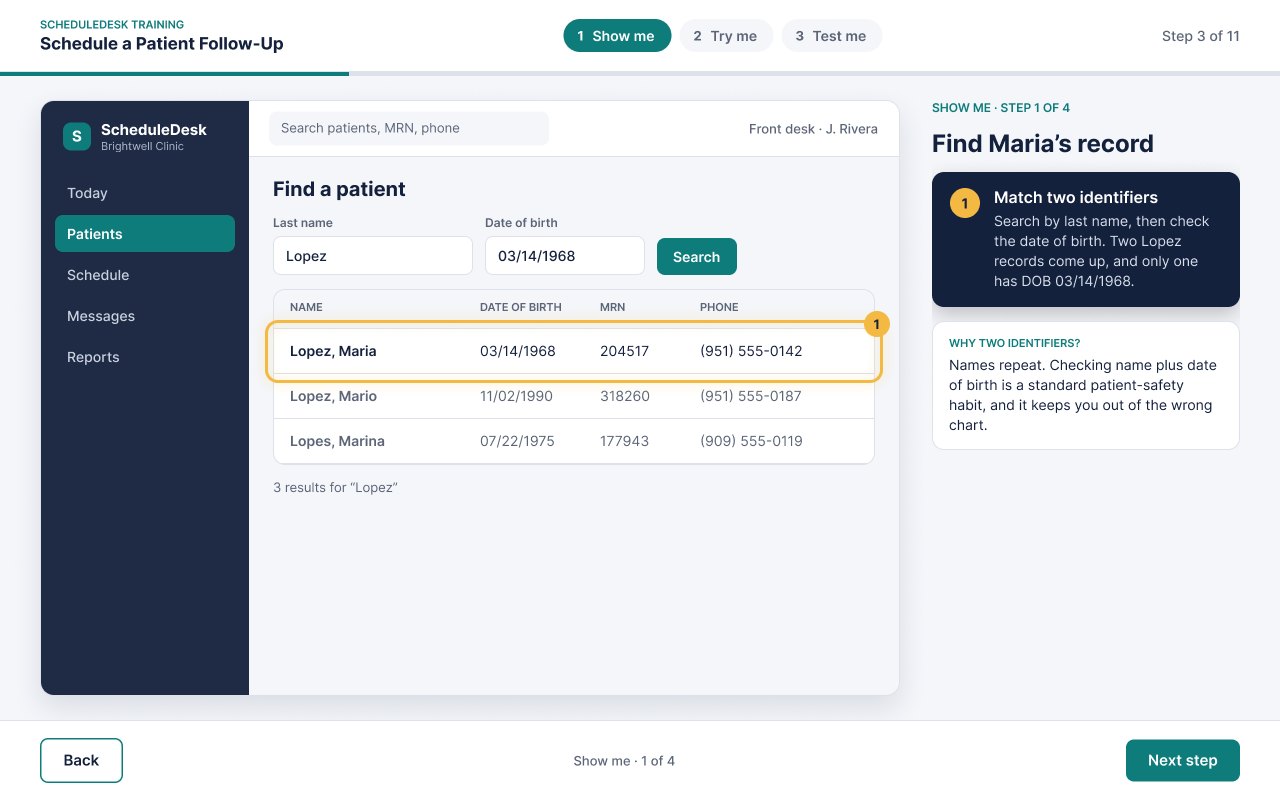
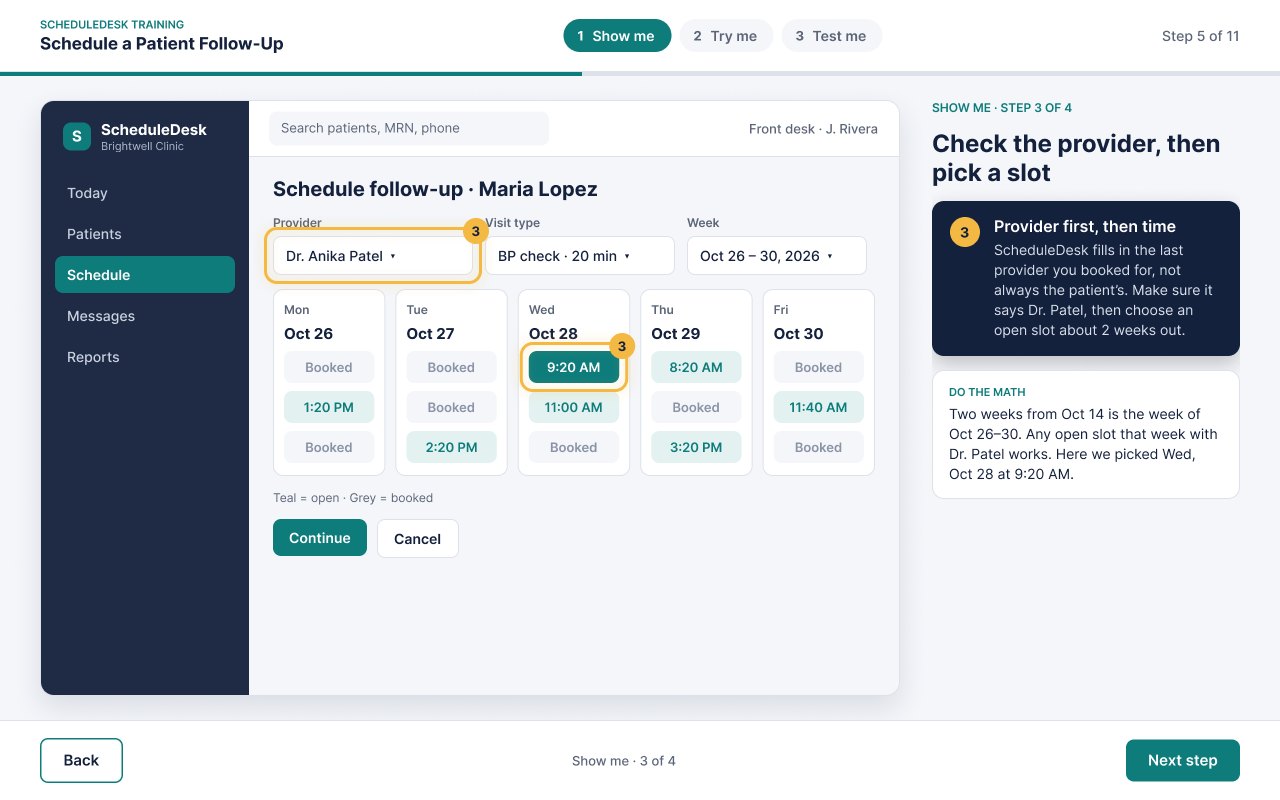
Four guided steps on a realistic app screen. Each step gets an amber focus ring with a number, a matching callout in a coaching column, and one short tip on why the step matters. The learner sees the whole task once before they're asked to do it.
Try me, the way the real job works
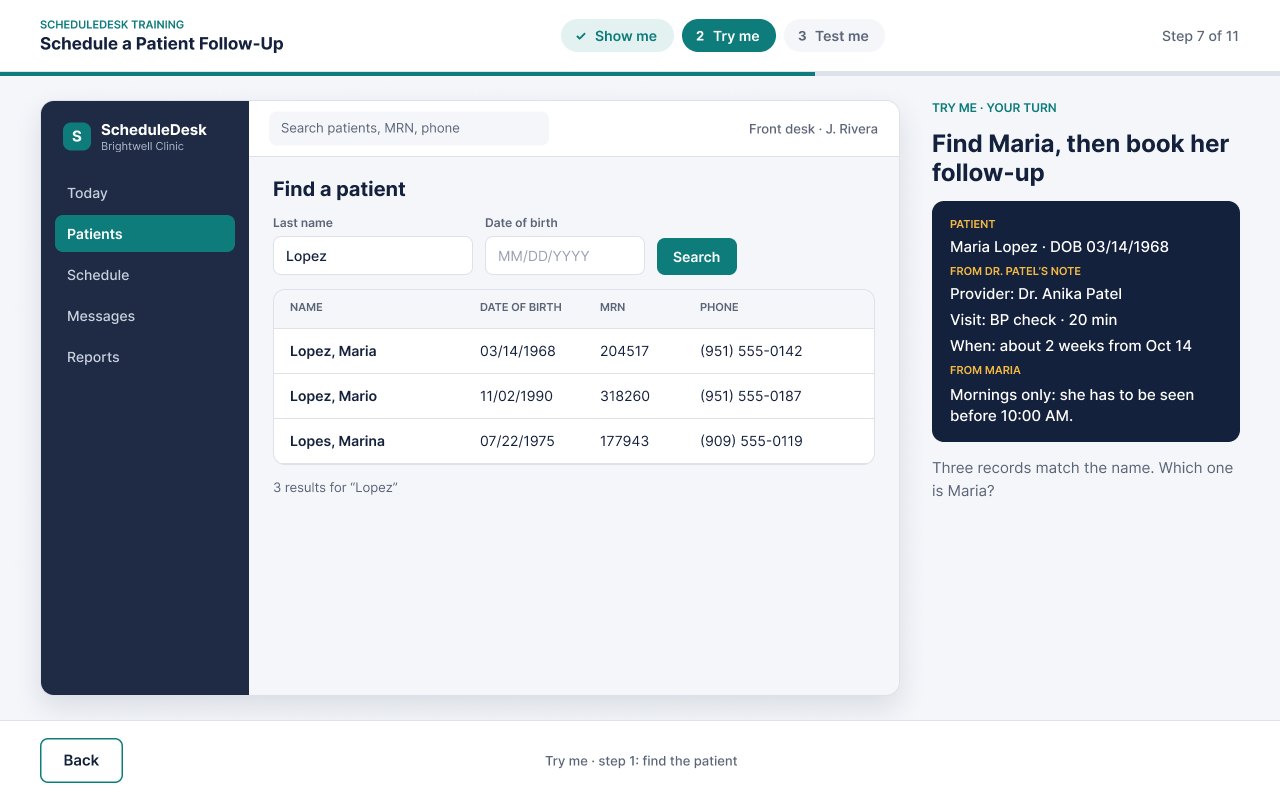
Try me starts on an empty Patients screen, and scheduling stays locked until the learner finds the patient. They really type: the search fields take keyboard input, so learners enter the last name and the date of birth themselves, then select Search or press Enter. A misspelled name or a wrong birthday gets its own feedback. A name-only search returns three look-alike records, and opening the wrong one brings up a reminder to check the date of birth.
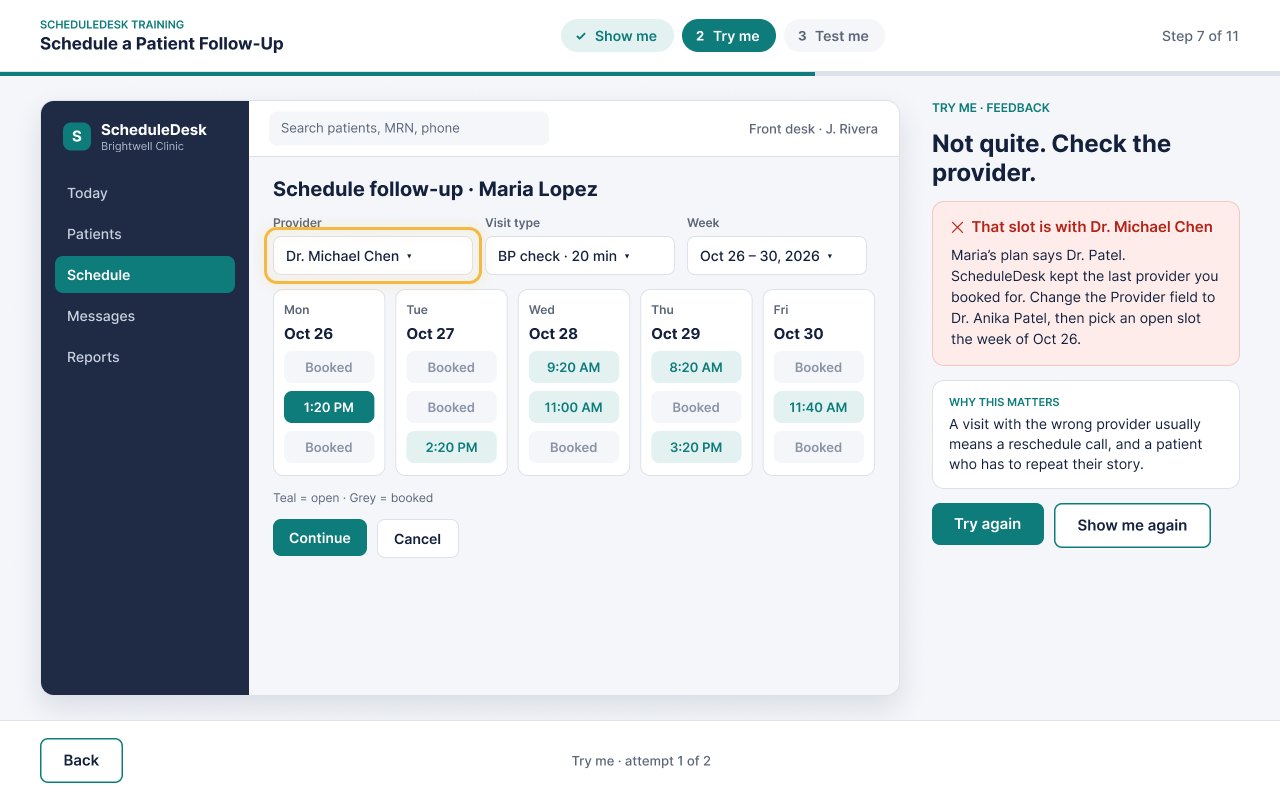
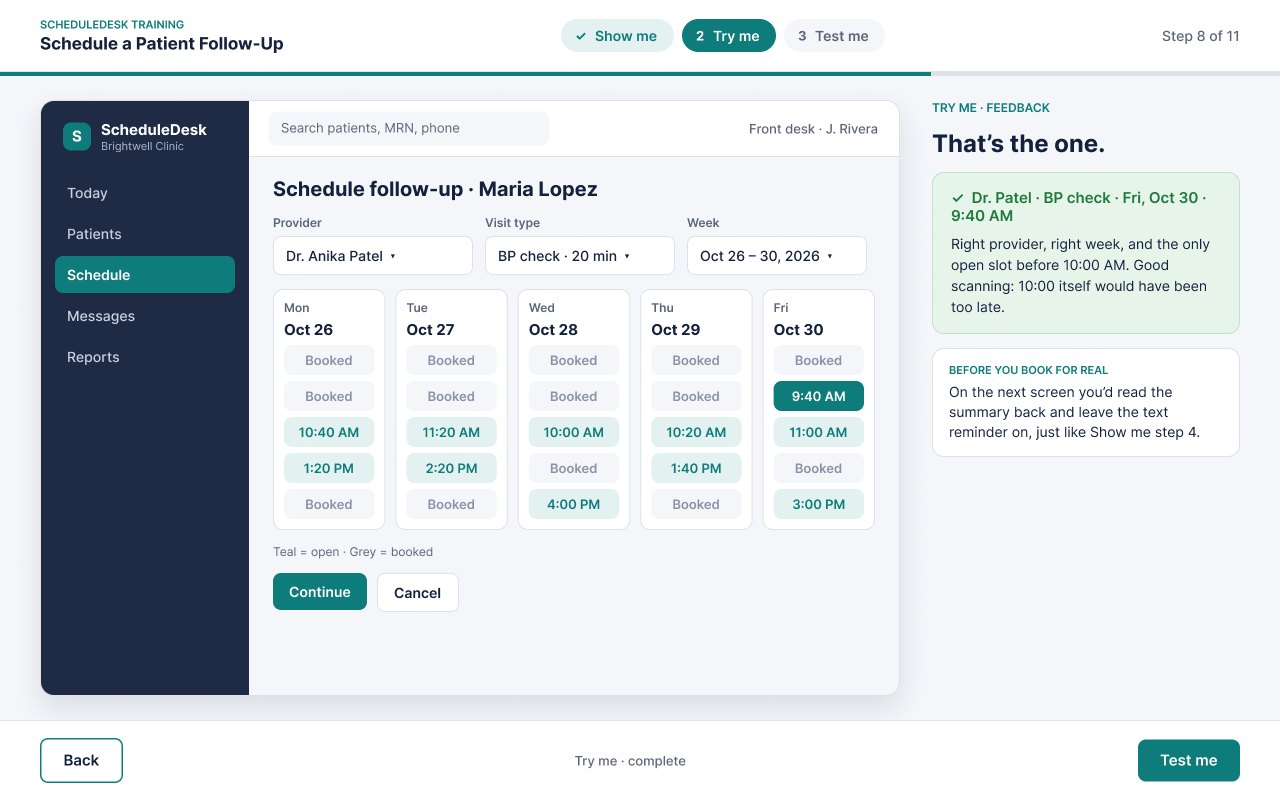
Then come two realistic constraints. The scheduler opens with Dr. Michael Chen already in the Provider field, carried over from the last booking, so learners have to open the dropdown and switch to Dr. Patel. And Maria can only come in before 10:00 AM. Dr. Patel's week is mostly booked, so learners have to scan every day to find the one open morning slot, Friday at 9:40. A 10:00 slot is there as a near miss. Every wrong choice gets specific feedback and a way forward.
Test me & job aid
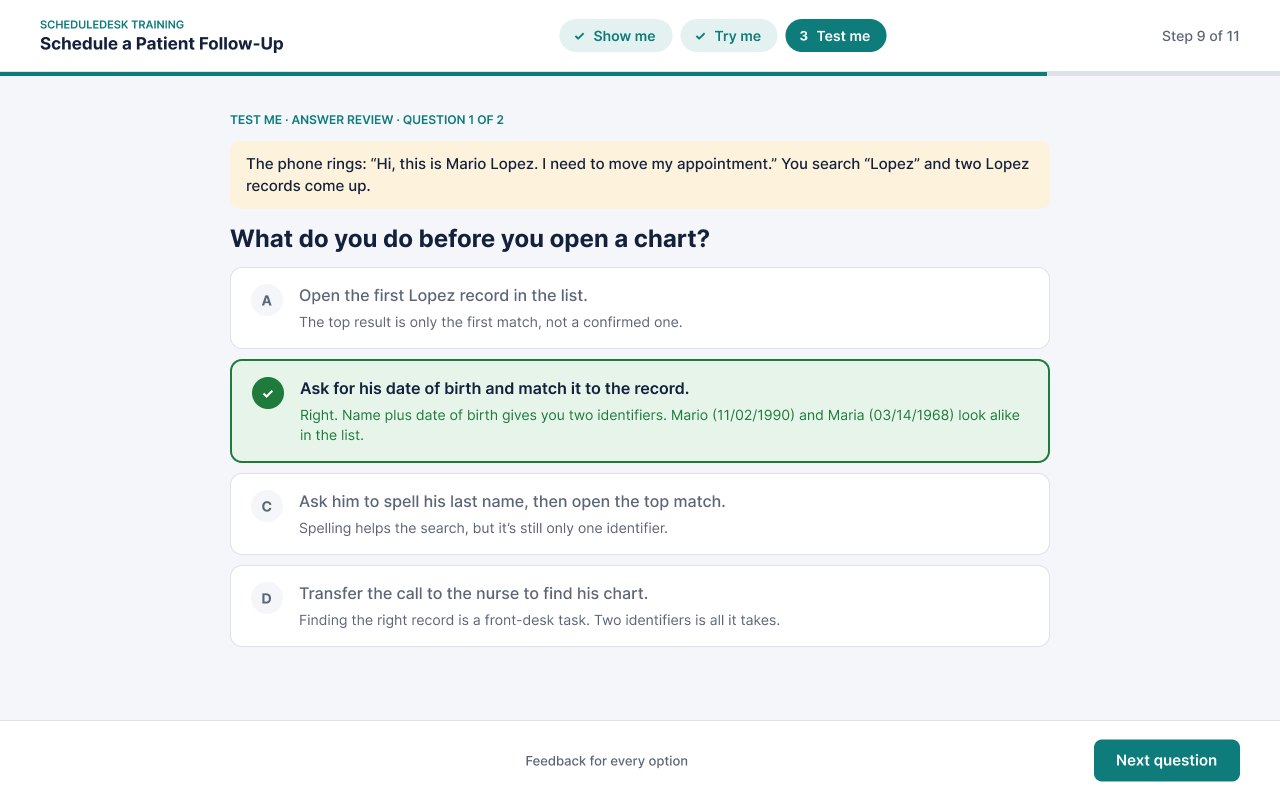
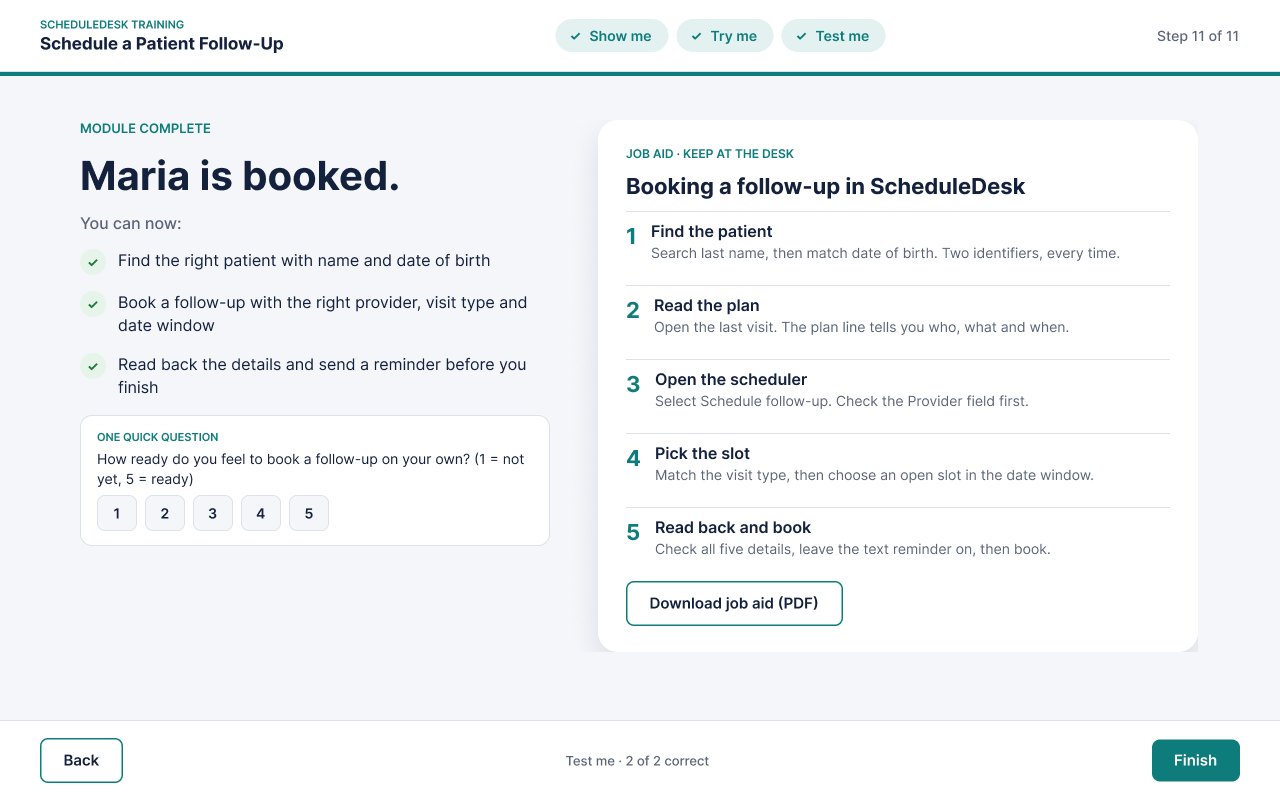
Two scenario questions move the habits into new situations: a phone call from a different Lopez, and a scheduler that opens on the wrong provider. The answer review explains every option, not just the right one. The module ends with a one-question readiness check and a five-step job aid that matches the order of the task.
Full Development
I built the module in Figma, starting with a small component library: a module header that tracks Show me, Try me and Test me, numbered callouts, an amber focus ring, buttons, answer options with correct and incorrect states, and the app's sidebar and top bar. Every screen is assembled from those pieces, so one change updates the whole module. Everything the tutorial points at works: learners can select the ringed patient row, the Schedule follow-up button, a time slot or Book appointment, or use Next step. In Try me, the patient search takes real keyboard input through Figma variables and key-press triggers. The app's sidebar and the Provider, Visit type and Week dropdowns all respond, and a wrong patient, a booked time or a slot after 10:00 AM brings up a short pop-up that explains why. Buttons and answers respond on hover. In all, there are 29 screens, 14 feedback pop-ups and more than 350 interactions. I then rebuilt the module as a web page in HTML, CSS and JavaScript, so it runs in any browser on a computer or a tablet at the front desk.
Accessibility & UDL
Designed so more learners can get in
Built in
- Feedback never relies on color alone: every result has an icon (✓ or ✕) and a plain-language explanation.
- No audio required: every instruction, callout and piece of feedback is on screen as text.
- One hint after a miss, plus “Show me again,” so learners can get support without starting over.
- Focus rings carry a number that matches the callout, so the cue isn't only the amber color.
- A job aid gives learners a way back to the steps after training ends.
Next accessibility pass
- Check the muted gray text and the amber hint panel against WCAG 2.2 AA contrast.
- Rebuild in an authoring tool with keyboard navigation, a logical focus order and screen-reader labels.
- Add alt text for the app screens and a text-only version of the job aid.
- Publish the job aid as an accessible PDF.
Evaluation plan
The module captures its own learning data, and a short supervisor check closes the loop on the job. Here's how I'd measure it with a real onboarding group, using Kirkpatrick's four levels.
New staff feel ready to book on their own.
The 1–5 readiness check on the wrap-up screen.
Built into the moduleStaff check the provider and the date of birth without prompting.
First-try results in Try me and both Test me questions.
Built into the prototypeStaff use the habits on real bookings.
A supervisor reviews each new hire's first 10 bookings for patient and provider accuracy.
PlannedFewer reschedules caused by booking errors.
Reschedule calls tied to wrong patient or wrong provider, compared with the previous hiring group.
Planned